
Basics

WIIOnline Handbook – The Guide for New and Experienced Soldiers

Introduction

Welcome to the front!
This manual accompanies you through the fascinating world of WWII Online and provides all the important basics for successful operation on the virtual battlefield of Western Europe.

Aimed at both new recruits and returning veterans, the guide will help you understand the ins and outs of WWII Online: a single, ongoing war campaign with hundreds of players, historic vehicles, and combined arms use on land, sea, and air. Teamwork, communication and tactical approach are always the focus.

Some of these basics are based on the official one WWII Online Guide Version 1.37.3, as well as various adjustments and extensions that were not covered there.
Persistent Limitless map
approx. 56,600 km² (Western Europe on a scale of 1:2)
24/7 Game operations
365 days of war – around the clock
Community Controlled
The players decide on attacks, defense and the course of a persistent 24/7 campaign.
Access & Campaign Main server
Unlimited server access for larger and longer PvP battles where real leadership and tactics determine the outcome.
Training and event server Game operations as required
Usually predominantly training servers
RECOMMENDATION:
Get help to show and test various things there.
In its current state (as of July 7th, 2026) it is difficult for new players to gain a foothold there.
Sandbox first person simulator

1. History of WWII Online

Essentially, World War II Online is a unique, 100% player-funded indie project. It was originally released in 2001 and continues to be developed to this day.

As a sandbox-based first-person simulator, the project brings together thousands of players on a single, seamless map of Western Europe with a total area of ​​over 300,000 square kilometers.

The game simulates all types of weapons in combined arms: infantry, tanks, artillery, aircraft and ships operate in a common world. Every action has a direct impact on the persistent campaign course, which can extend over several weeks.


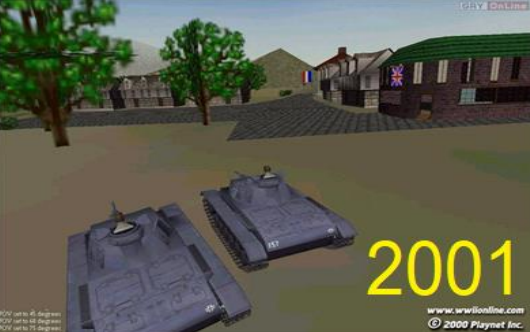
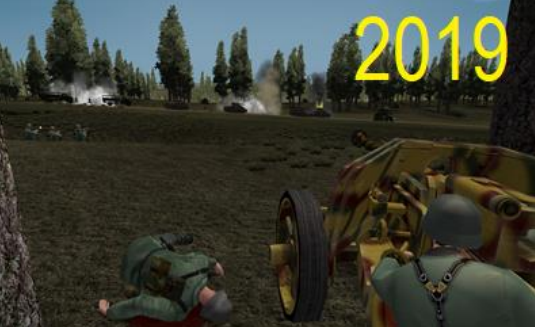
Visual engine development milestone comparison between the classic 2001 version (left) with simple textures and the modernized version (right) with improved vegetation density, shaders and detailed vehicle models

Graphics Engine (2001) bild2001
Graphics engine (2019–present) bild2019
Servers & Personas

3. The start of the game

After starting the game you will be taken to the main interface. Here you have to make basic settings regarding your persona and the server.

Server Selection - The game offers three primary server environments
Offline mode: Perfect for learning the complex controls of aircraft and tanks. All vehicles are available without restrictions. Deal with it here!
Online training server: Allows you to practice together with other players. Bases can be contested, but cities cannot be captured permanently.
Conditionally usable! Search for help on the main server or well-known forums.
Main server (campaign server): The persistent real-time war. All rank restrictions, supply lines and strategic rules apply here.

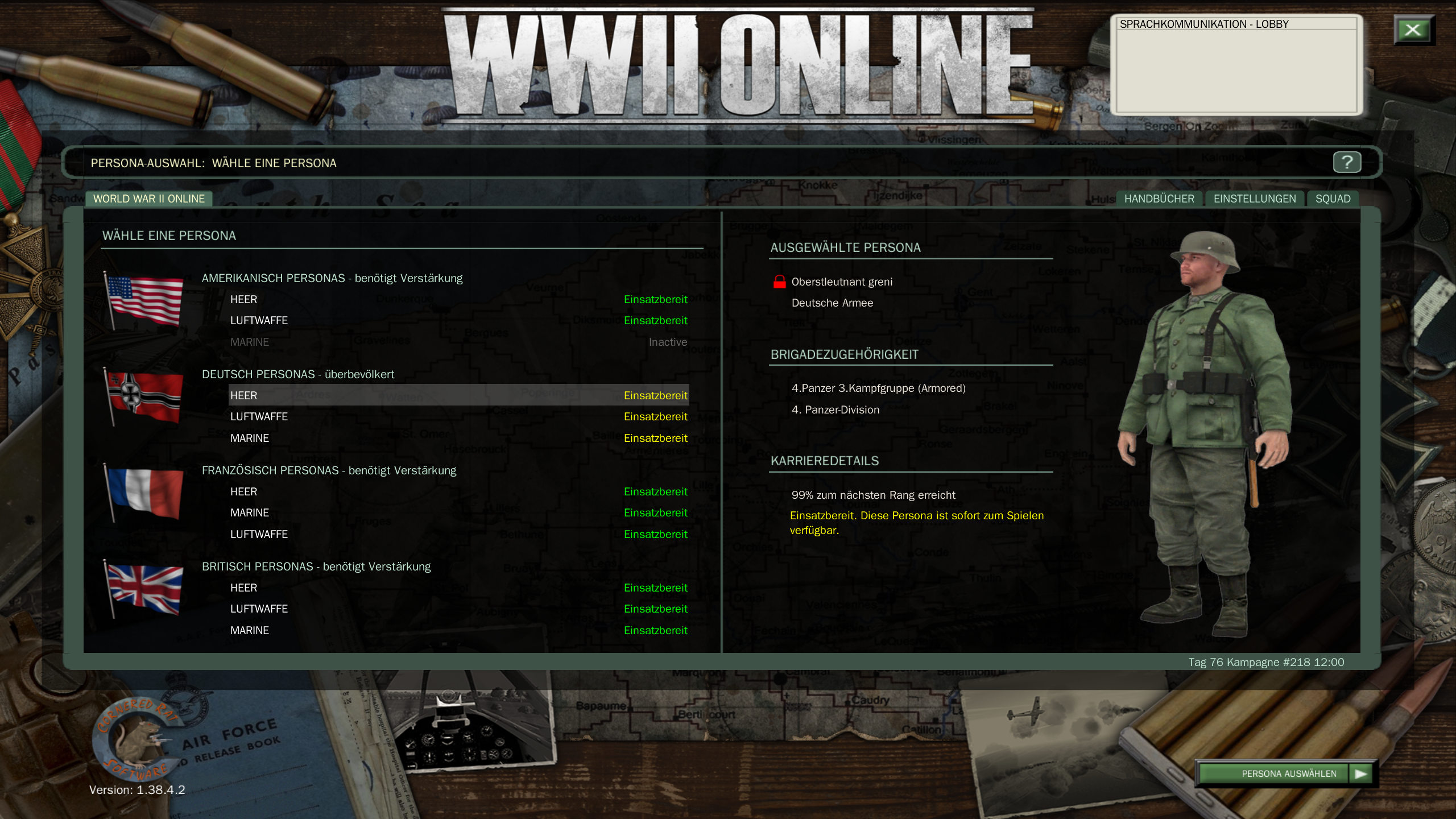
Persona selection screen

You have to choose a faction: The Axis Powers (Germany) or The Allies (Britain, France and later the USA).

The game does not force artificial faction balance, but does have a dynamic join delay (time penalty) if one side is heavily rushed. After choosing a faction, you are bound to this page for 15 minutes.
When the spawn delay occurs, it will be displayed behind the faction on this screen.

The home screen. Here you choose your side. Startbildschirm
Integrated voice communication

4. Voice radio (IVC)

The Integrated Voice Communications (IVC) system simulates historical radios and is essential for survival.

By pressing the combination L-Ctrl + TAB Switch cyclically through the available radio channels or select the corresponding F-keys as they are named in the chat area.


Server Selection - The game offers three primary server environments
Lobby channel: Global channel for strategic announcements from the executive level.
Faction channel (Side): Connects all players who are in the same target area.
Mission channel: Specific radio for all participants in your current mission.
Squad channel: Private channel for your own clan/squad.
chat_abbildung

Note your own key assignment here!

To talk, press and hold the Push-to-Talk button (default V).

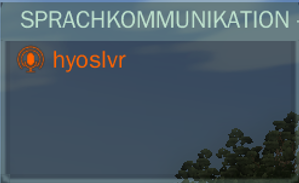
Funk-HUD-Anzeige
In-game radio HUD display
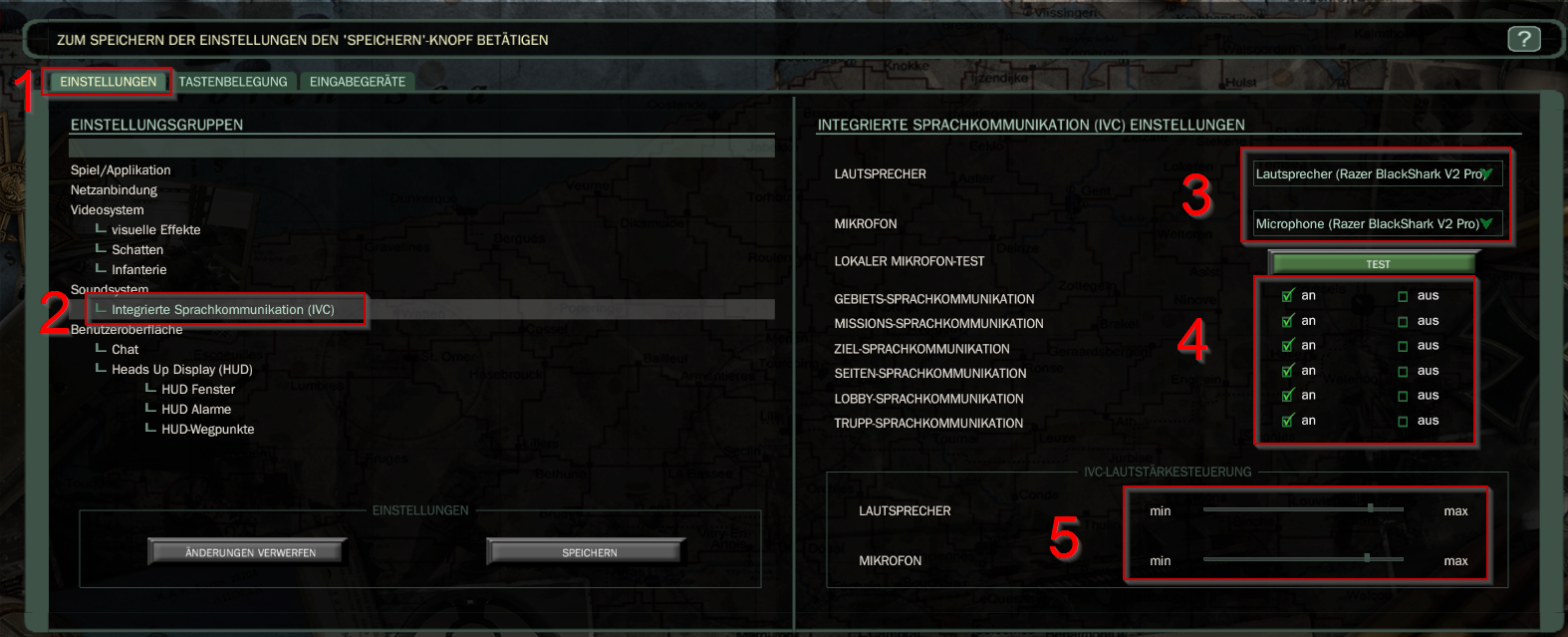
Here you set the IVC properties under your settings.
  1. Select the Settings tab
  2. In the left navigation, select Integrated Voice Communication (IVC)
  3. Select your speakers and microphone or headset
  4. Use your own discretion to determine which communications you consider important.
  5. Adjust the volume as needed

ivc_setting
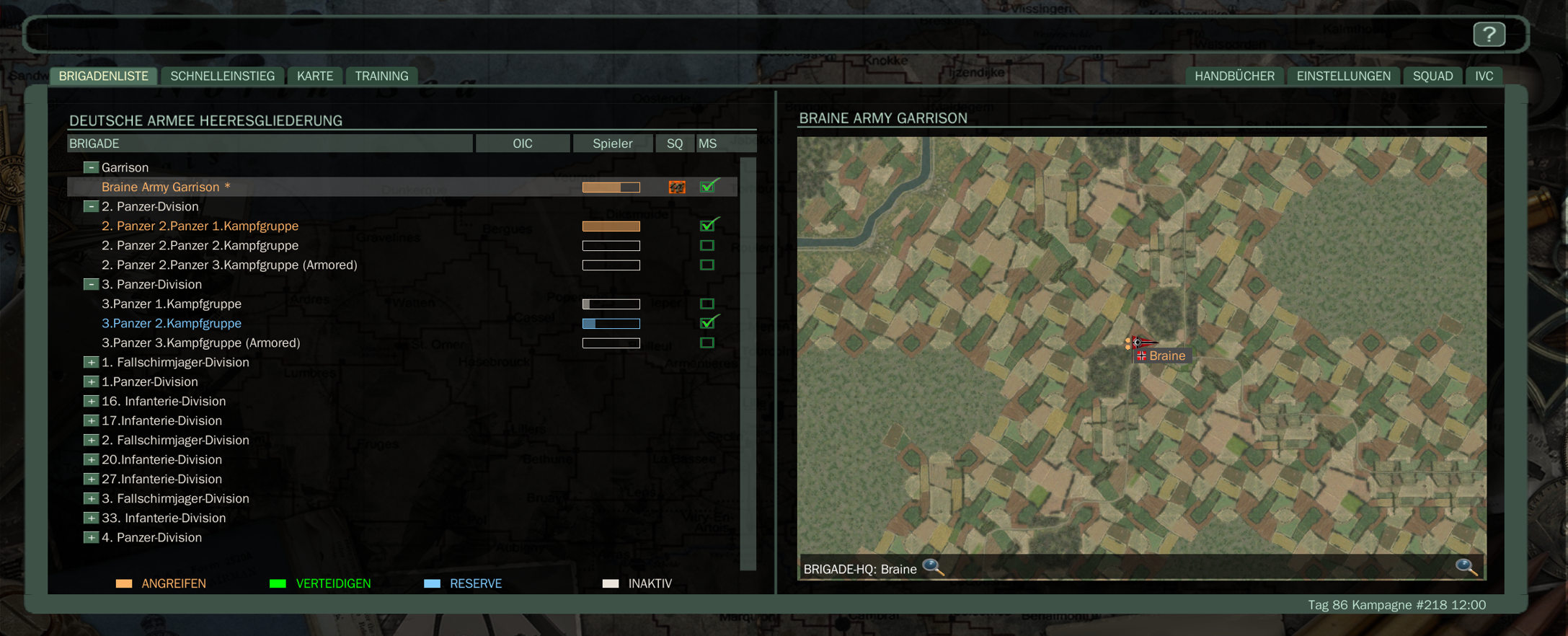
Preparation area

6. Entry point


Mission overview & unit pools

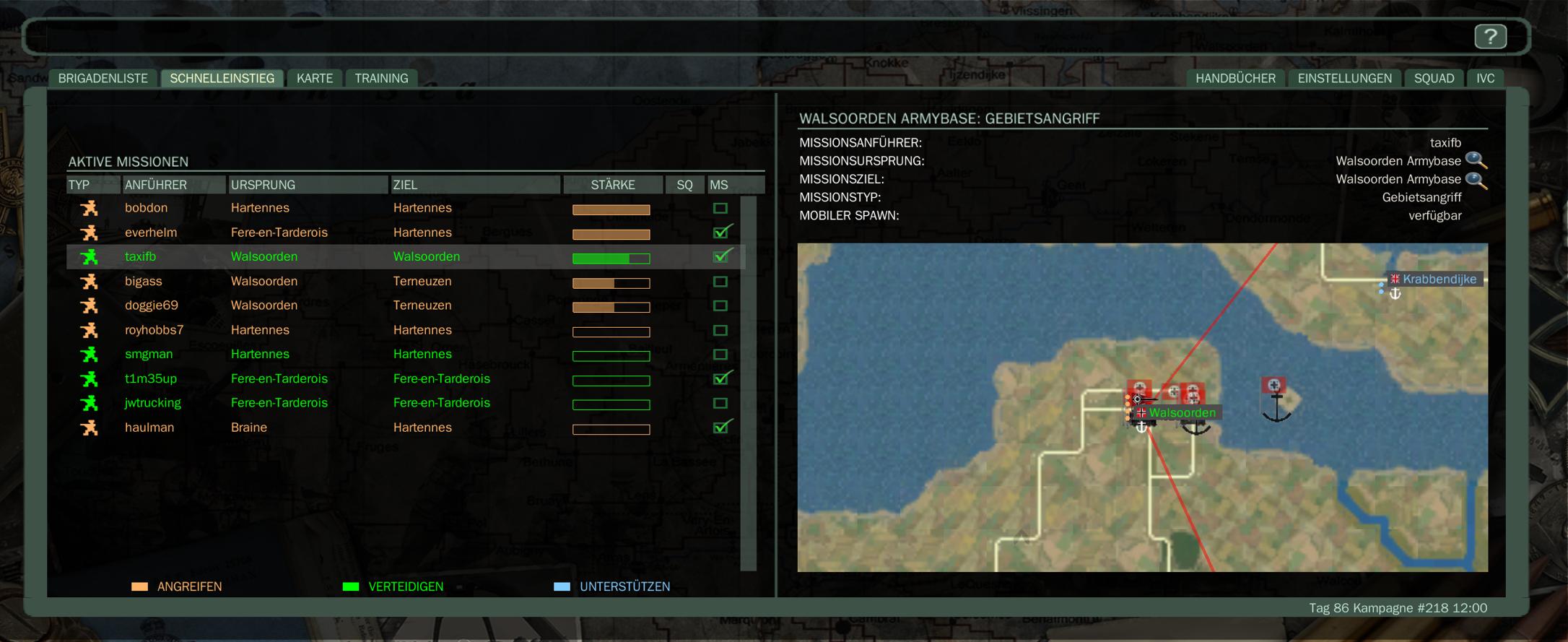
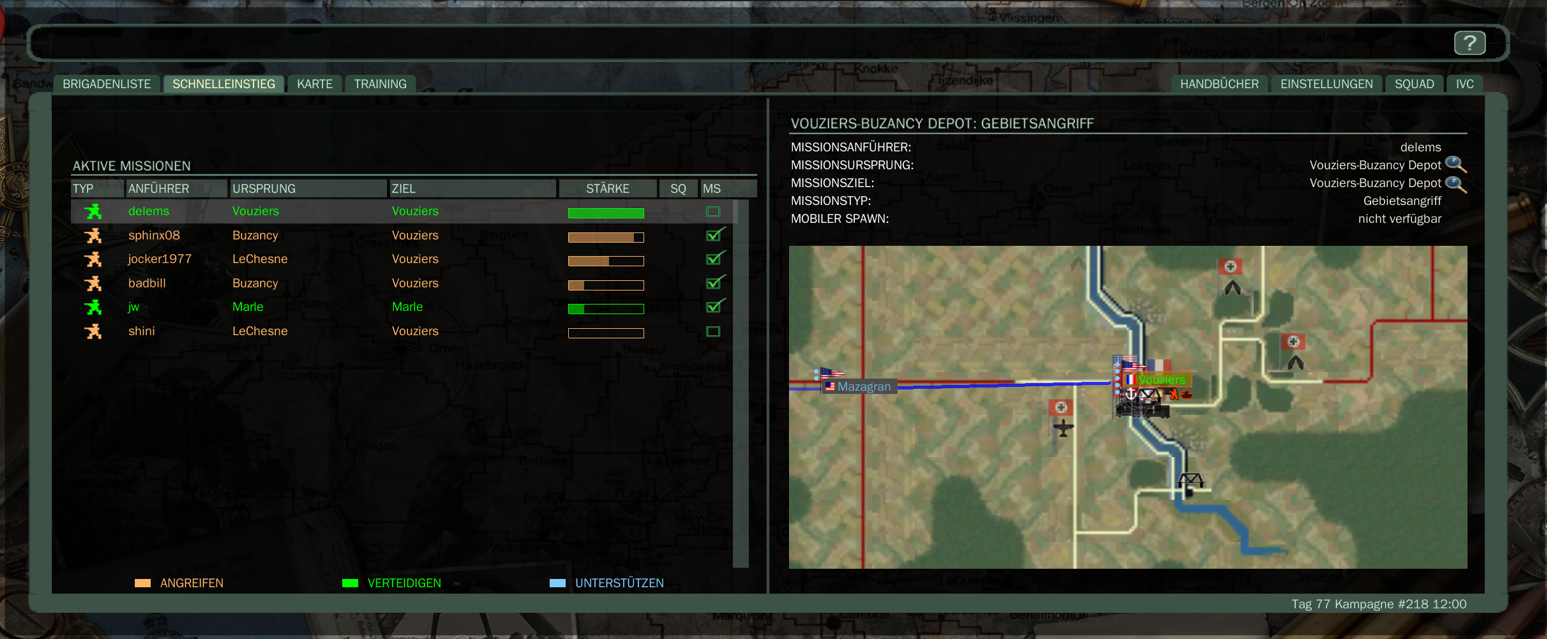
As soon as you select a city on the map or an active battle, you enter the entry point of the missions operating there.

The mission description and the specific orders from the leader.

You can join the mission here, taking into account the origin and destination.

Under the Strength section you can see the population for the mission. The color green indicates a defense mission and red indicates an attack mission.

All you need to DO is double click on the mission to join it


missions

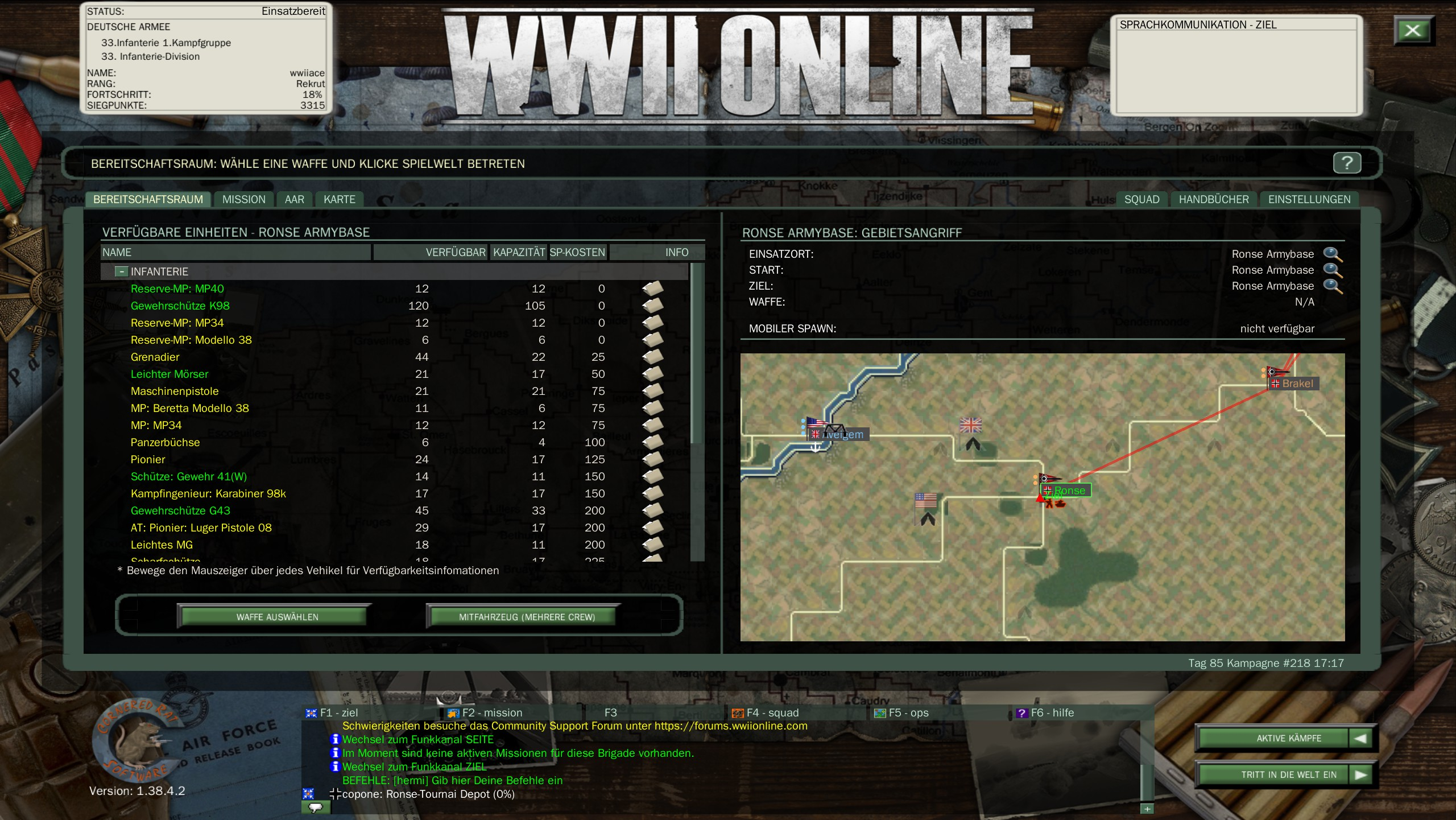
The list of available equipment (Infantry, Armor, Air, Navy) and their exact number in the local Depot.

The list (see 1.) can be scrolled down to see, among other things, other types of weapons such as armored vehicles, anti-aircraft guns/AT Gun, as well as trucks/tractors and then select accordingly.


Ausruestungansicht

In the lower screen you can see the Steam version of the view.
Yellow here means: Your first rank is not enough or there is no further supply available.
Hover over the unit with the mouse to receive relevant information.


Select your desired unit and click "Enter Game World" to appear (spawn) on the battlefield.
Always remember that you cannot use all units at the beginning, as your rank may have to be earned first.


Steam_ansicht
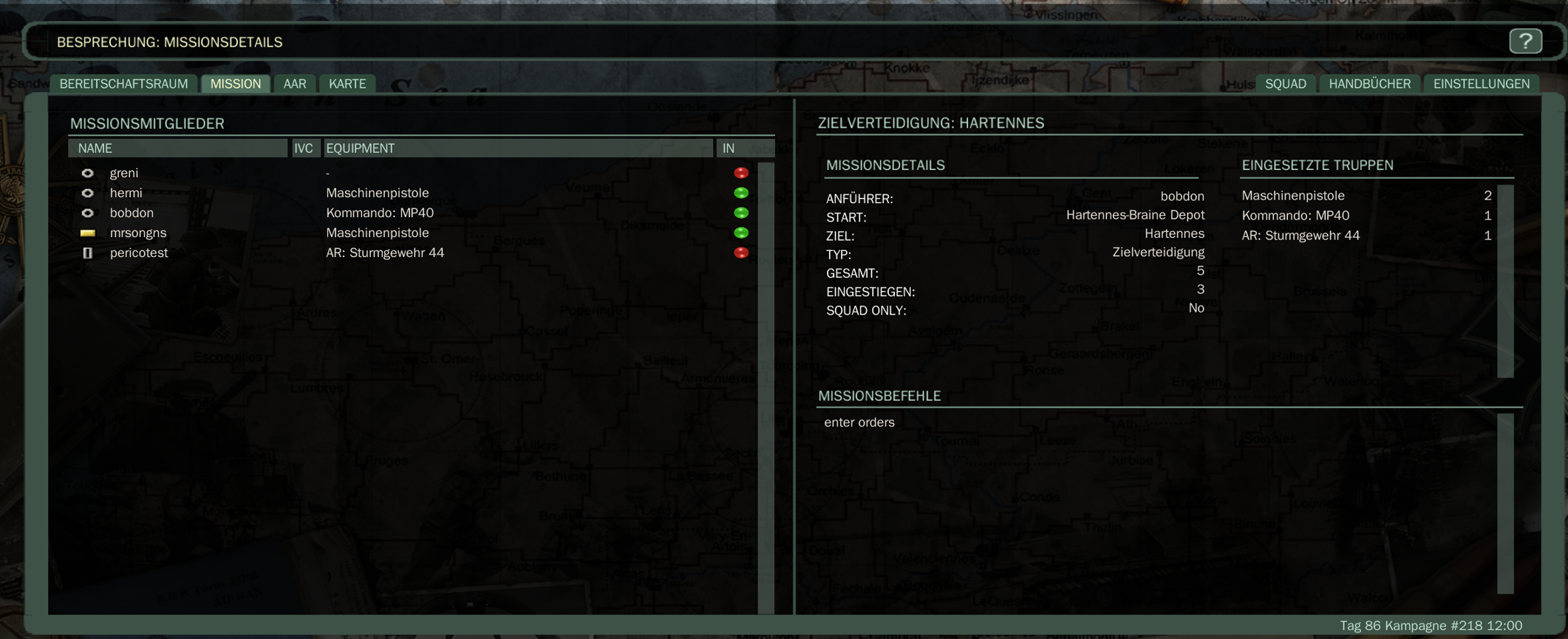
Example view of all players currently in this mission.
At the same time, other missions are also running with the same goal to place more MSPs in the respective area.

Player_in_mission

Ground combat

7. Infantry gameplay

The infantry - queen of weapons

The infantry is the heart of the game. Without them you can't progress in the game. Only foot soldiers are able to enter enemy flag houses (CPs - capture points, AFs - airfields, ABs - army base / bunkers) and capture them accordingly.


Damage Model & Endurance

The game does not use a classic life point system, but rather complex hit zones (head, torso, limbs). A hit to the head is instantly fatal. Severe hits to the arms or legs result in severe shaking when aiming or permanently slowed movement. There are no medics or healing in the field; Injured soldiers must fight the limitations until virtual death or successful despawn.

Endurance (stamina) increases when sprinting Shift + W consumed. If it is exhausted, the weapon begins to wobble extremely. Lie down ( Z ) or kneel down ( X ) to quickly regenerate stamina.


Essential infantry controls (default keybinds)

ACTION BUTTON DESCRIPTION
Movement W/A/S/D Standard forward, backward and sideways movement.
Aiming (About Rear Sight & Korn) Rechte Maustaste Dramatically increases precision. Indispensable for long distance shots.
Shooting/hitting Linke Maustaste Fires the selected weapon.
Reload R Replaces the current magazine. Any remaining bullets in the magazine are lost!
Change weapon 1 bis 0 Switch between rifle, pistol, grenades, knife and special tools.
Use binoculars B Available for infantrymen.For vehicles, the default is the letter O

Personal assessment

info

In my opinion, the infantry offers the most intense gaming experience in WWII Online. No other branch of the armed forces is so close to the action and so dependent on teamwork. Every successful urban battle for the CPs, every secured position and every meter conquered is the result of cooperation, tactics and patience. That's precisely why I recommend new players to gain their first experience as an infantryman - this is the best way to get to know the basics of the game.

Complex tank simulation

8. Tank gameplay

Tanks and their capabilities

Tanks and armored vehicles in WWII Online are highly complex simulators. They DO not have health bars, but rather internal components (engine, fuel tank, ammunition storage) and individual crew members that can be hit and disabled separately when hit, depending on type/caliber.


See also: Tank tactics

Controls & positions in the tank

position Task (With standard keyboard layout)
driver Controls the chains W/A/S/D. Gears must be done manually using the buttons [ (downshift) and ] (shifting up).
Gunner Rotate the turret and gun using the mouse. The main cannon is fired using the left mouse button, the coaxial machine gun is fired using the right mouse button.
commander Can open the hatch (0) to use binoculars (B) to search the terrain for targets. Caution: Extremely vulnerable to snipers when open.

Multiple crews (multicrew) possible

Two real players can be in the same tank. For example, one player takes over the steering and maneuvering (driver) and, depending on the armored vehicle, the front machine gun, while the second player can concentrate completely on sighting and engaging targets (gunner/commander).

PERSONAL NOTE

info

Use PPO positions on the tank

Tanks can build their own position. It can partially protect you against enemy fire or bombs.

Familiarize yourself with the German tank, among other things -> see Jalik's tank guide

Air and naval forces

9. Aircraft & Marine

air force

The flight simulation requires patience and ideally a joystick, but can also be controlled with the mouse. Airplanes simulate aerodynamic forces such as stalls, torque effects and engine overheating.


See also: Tips and Tricks -> Air Force tab

marine

The Navy operates on the major rivers and the English Channel coastal waters. Armed cargo ships and troop carriers transport supplies and mobile spawns, while destroyers can bombard positions on land with heavy artillery.


PERSONAL NOTE

info

Rise in Marine rank

...may be the hardest thing to control the popular destroyer in WWIIOnline.

Therefore, pay attention to missions for the marines or coastal boats.

Situational awareness

10. Battle management

General situational awareness

The basis for tactical decisions through a comprehensive understanding of the current situation in the game should be acquired in order to understand the situation and the actions of the HC (High Command).


Own situational awareness

Situational awareness often determines success or failure.
Anyone who carefully observes their surroundings will live longer and contribute more to the success of their mission than a player who acts carelessly. Therefore, keep an eye not only on the goal, but also on your surroundings. Pay attention to gunshots, engine noises, smoke, movements on the horizon and chat or voice messages. Use the map regularly to check the current frontline situation, your own troops and reported enemy contacts.


Visual contact & in-game tags

Allied players are only displayed at short range with a small blue or green name and unit tag (depending on your own game settings). Enemies never have a visible tag. If you see a unit that doesn't have a tag, it's definitely the enemy!


The Early Warning System (EWS)

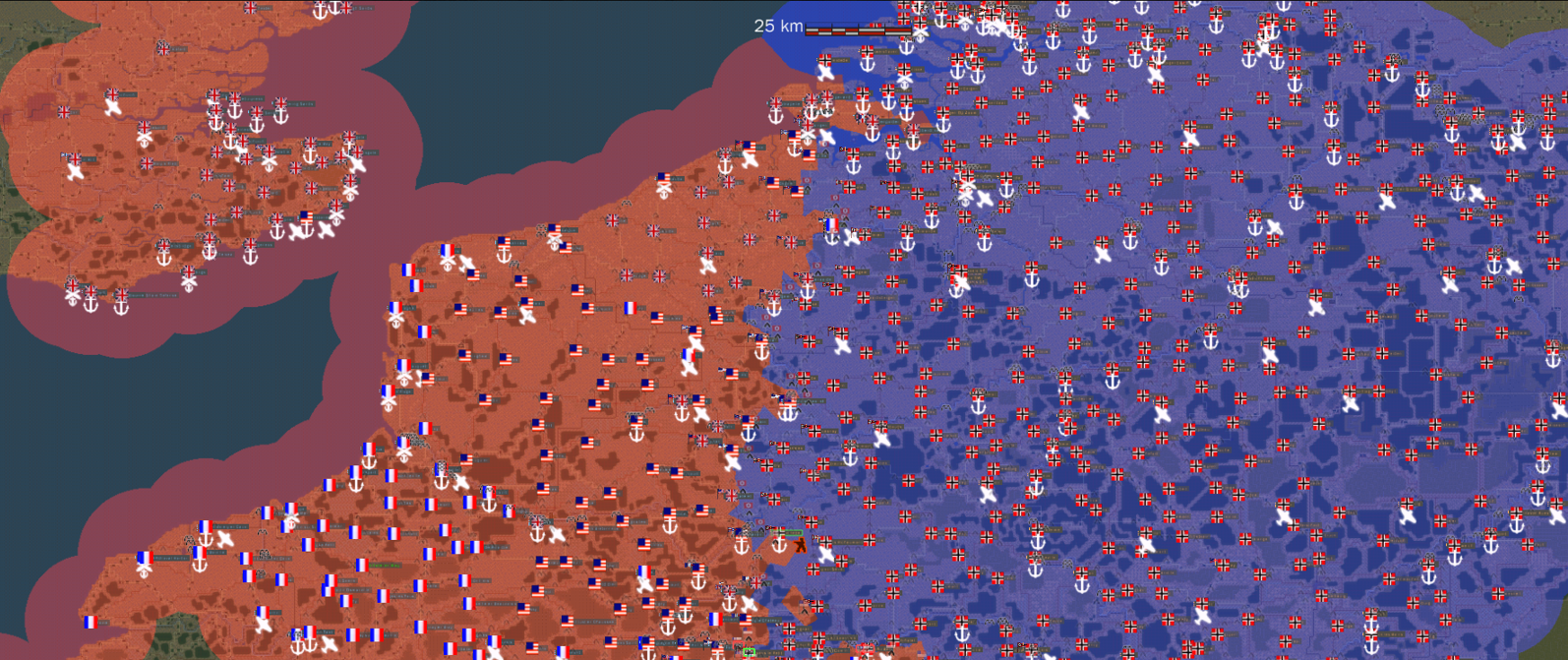
The interactive map has an automated, AI-powered early warning system. As soon as enemy troops enter the airspace or ground radius of a city, the corresponding city symbol on the map is modified:


TACTICAL NOTE

info

Before each advance, consider:

Pay close attention to chat and map messages for enemy reports!

Where is the enemy likely to be?

Where are our own forces located for support?

Is there further cover or means of escape?

What dangers could await me in the next few seconds?

Take into account enemy spawn points that could also have been set up behind you!

Logistics & Pools

11. Replenishment & Spawn Rules

Limited Equipment! (Please note!)

Equipment is not infinite in WWII Online. Each Brigade has a fixed pool of soldiers, tanks and aircraft.


Entry points (spawn points)

There are four primary locations where you can spawn in the game world:


type Replenishment
AB - Army Base The main fortress(es) of a city. It has massive concrete bunkers, anti-aircraft emplacements and the largest amount of supplies.
FB - Forward Base Forward bases between two cities. They serve as a springboard for attack or as a first line of defense. When a FB falls, connection to an attack target is lost. This means that spawnable depots in the enemy city can no longer be used.
Depot Smaller outposts within a city (e.g. infantry Depot, tank Depot). You control urban melee combat. Especially if this Depot has a connection to an enemy FB.
MSP Mobile Spawn Point. Modified trucks or armored personnel carriers (APCs) can create mobile spawn points, which players usually hide in the terrain. They allow infantry to spawn close to the objective. Depending on the MSP type, Flak & Paks are also possible!

Supply lines and encirclement

When a city is cut off from all sides by the enemy, the local garrison is surrounded.
This means: Destroyed tanks or fallen soldiers DO not return to the pool. The city is doomed to bleed dry unless the blockade is broken from outside. The encircled brigades are routed, i.e. sent to the training camp for 24 hours before they can take part in the fighting again.

The High Command

12. Mission Goals & Strategic Leadership

High Command (HC)

The High Command is a community-organized command structure. Players take on leadership roles, coordinate the use of available resources and develop strategies to make the campaign successful.

The entire campaign is led by the High Command (HC).


Process of a city attack

A coordinated attack usually takes place in clearly defined phases to maximize success:

V = A × S + L
(Where V = Viktoria/Sieg, A = Reconnaissance, S = Spawn Security, L = Logistical Superiority)

phases Implementation
Phase 1 Backup of the Forward Base (FB). The attacking team must capture or hold the FB between their own city and the enemy city.
Phase 2 Placement of MSPs. Logistics drivers move mobile spawns into hidden positions around the enemy city.
Phase 3 Neutralize PDepots. The infantry advances to the outskirts, penetrates the depots and holds the flag until the outpost changes hands.
Phase 4 Storm the main base (AB). As soon as the depots are secured, the main bunker is attacked or even earlier in order to disable the army base as a spawn point.

Victoria/Victory

As long as all CPs including all army bases in a city are in Allied or German hands, the city is considered conquered.
Mission completion, AAR & squad joining

13. Operations

Mission end

When a combat mission ends, the location determines the mission outcome. Despawn is usually done via ESC; In case of immediate danger, a short timer prevents you from avoiding certain loss.

Mission status

Every mission ends with a status that documents the outcome of the mission. Depending on the outcome, a player can be rated as RTB (returned to base), RES (rescued), MIA (missing in action), or KIA (killed in battle).

status Meaning impact
RTB Return to Base: Successfully return within range of a friendly facility. Counts as a mission success and has a positive effect on your own points and supplies. The unit goes back into the pool and is immediately available again. Either for yourself or another player.
RES Rescued: Despawn outside the RTB zone but in friendly territory. Unity is saved but not as valuable as RTB. The unit will only be added back to the spawn pool after 15 minutes.
MIA Missing in Action: Despawn in feindlichem Gebiet außerhalb sicherer Reichweite. Die Einheit wird erst nach 60min dem Spawnpool wieder hinzugefügt. Negativeres Ergebnis für Einheit und Wertung.
KIA Killed in Action: Tod durch Feind, eigene Seite, KI-Verteidigung oder Selbstverschulden.Die Einheit wird erst nach 60min dem Spawnpool wieder hinzugefügt. Einheit geht verloren und muss wieder in den Nachschub zurückgeführt (automatisiert nach Zeitablauf) werden.

AAR - Missionsnachbesprechung

Nach jeder Sortie öffnet sich der After-Action-Report (AAR). Dort werden Abschüsse, Treffer, Eroberungen, Ergebnis, Zeit im Einsatz und Punktwertung angezeigt. Diese Auswertung ist wichtig, um die eigene Leistung zu prüfen und den Einfluss auf Rangpunkte und Nachschub zu verstehen.


Squadbeitritt

Spieler können außerdem Squads beitreten. Squads erleichtern Kommunikation, Missionsbeitritt und koordinierte Angriffe. Über Squad-Reiter und Chatbefehle, wie .join Spielername or .j Spielername lassen sich Missionen befreundeter Spieler schneller erreichen.


Rang, Tier & Herkunft

14. Materialzugang

Nicht jede Einheit ist jederzeit verfügbar. Der Zugriff auf Waffen, Fahrzeuge, Flugzeuge und Schiffe hängt von mehreren Bedingungen ab. Technologischer Tier: Kampagnen entwickeln sich historisch weiter. Spätere Ausrüstung wie fortgeschrittene Panzer oder US-Einheiten wird erst in höheren Tiers freigeschaltet.
RIDER (TAB) FUNCTION & CONTENT
Missionsursprung Garnision, Brigade, Army Base, Airfield, Hafen oder Forward Base bestimmen, welche Einheitentypen gespawnt werden dürfen.
Persona-Rang Einige Waffen oder Fahrzeuge benötigen einen höheren Rang. Fehlende Verfügbarkeit wird im Ready Room entsprechend farblich oder über Hinweise angezeigt.
Account- oder DLC-Zugriff Bestimmte Einheiten können je nach Accountmodell oder Zusatzinhalt eingeschränkt sein.
Verfügbarkeit Abhängig durch Tier + Ursprung + Rang + Nachschub + Account
Kampagnenziele

15. Missionsziele & Kampagnenmechaniken

Strategische Ziele

RIDER (TAB) FUNCTION & CONTENT
Factory Bombing Bombardierung von Fabriken verzögert Produktion und Nachschub.
Town Capture / AO Städte werden über Angriffsziele, Flaggen und Einrichtungen umkämpft..
Spawnable Depot Capture Eroberte Depots ermöglichen nähere Einstiegspunkte für Angreifer.
FB-Zerstörung Forward Bases unterbrechen Angriffsachsen und reduzieren Spawn-Möglichkeiten in der Stadt selbst und der FB.


Taktische Aufgaben

RIDER (TAB) FUNCTION & CONTENT
Brücken zerstören/reparieren Verändert Bewegungsrouten für Fahrzeuge und Nachschub.<
KI-Stellungen zerstören/reparieren Schwächt oder stärkt Verteidigungspunkte einer Stadt.<
Equipment, Fuel & Ammo Resupply Lkw und Logistik halten Angriffe über längere Zeit aufrecht.<
PPOs Spieler platzieren Hindernisse, Deckungen und Kontrollzonen zur Geländesicherung.
Punkte & Führung

16. Belohnungen, Rangpunkte & Führung

Rangpunkte

Rangpunkte entstehen aus Einsatzleistung, Sortie-Ergebnis und Zielbeiträgen. Abschüsse allein entscheiden nicht: erfolgreiche Rückkehr, Eroberungen, Verteidigung, Reparatur und Teamkoordination sind ebenfalls relevant.


Belohnungen

RIDER (TAB) FUNCTION & CONTENT
Rangpunkte Rangpunkte entstehen aus Einsatzleistung, Sortie-Ergebnis und Zielbeiträgen. Abschüsse allein entscheiden nicht:
Erfolgreiche Rückkehr, Eroberungen, Verteidigung, Reparatur, Zerstörung und Teamkoordination sind ebenfalls relevant. Munition bereitstellen an andere Spieler ebenfalls.
Ribbons & Nominierungen High-Command- und Community-Auszeichnungen können besondere Leistungen sichtbar machen.
Nur eine optische Nummer im .com Forum. Hat NULL Auswirkung inGame.


Führung im Gefecht

Führung ist nicht zwingend an High Command gebunden.
Auch normale Spieler können Angriffe strukturieren, Prioritäten kommunizieren und Truppen sammeln. Entscheidend sind klare Missionsziele, verständliche Chat- und Funkanweisungen sowie regelmäßige Lageupdates.
Das stimmt soweit, aber ohne HC Unterstützung schwierig andere Spieler zu motivieren!!


role Task
Mission Leader Setzt Ziel, Spawnpunkt, Missionsbefehle und koordiniert die Gruppe.
Town OIC Ordnet Angriff oder Verteidigung einer Stadt, priorisiert Depots, CPs, FBs und Nachschub.
High Command / Reserve HC Steuert strategische Ziele, Brigadebewegungen und übergeordnete Frontplanung.
×

Unit comparison